
Portfolio composition data can be updated manually or imported from an Excel file.
1. Manual input
Use this option when you want to update portfolio composition data directly for one specific program.
Select the program in the left-hand panel. Then open Portfolio Composition in the right-hand panel.
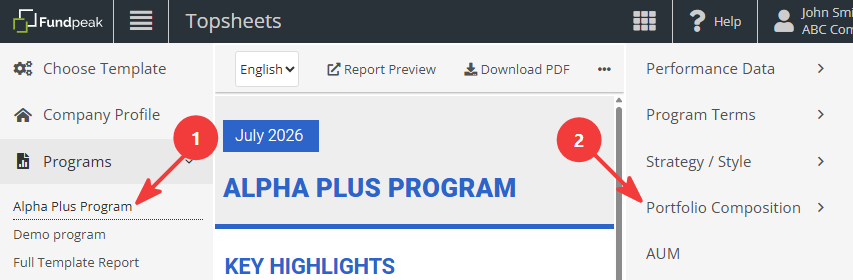
Select the required section, update the required values, and click Save.
2. Prepare and upload an Excel file
Portfolio composition data can also be imported using the Mass Portfolio Composition Import tool. This can be used to update either a single program or multiple programs at once.
If you are not familiar with mass imports, see Import performance data for multiple programs for information about preparing the file, selecting import options, validating the data, and running the import.
2.1 Prepare the import file
Please note that the Portfolio Composition import file uses a different structure from other mass imports. Program codes are listed at the beginning of each row rather than at the top of each column.
We recommend starting by downloading the sample file available on the Mass Portfolio Composition Import page.
The main columns are:
- Code – must contain a unique program identifier. See Creating Import file / Mass import file for more information.
- Category – specifies the Portfolio Composition section where the data will be imported. Possible values include Stock Sectors, Futures Sectors, REIT Sectors, Other Sectors, Investment Exposure, Geographic Exposure, Geographic Exposure Regions, Market Cap Exposure, Credit Rating, Instruments, Top Instruments, and ESG Score.
- Field – specifies the individual item within the selected category, for example a sector such as Energy, a rating such as AA+, or a country such as United Kingdom.
- Value – the numeric value for the selected field. Enter the value as a number, not as a percentage.
- Date – use this column to import historical values. If the Date cell is empty or the Date column is omitted, the data will be imported as current values.
See Available fields for Mass Portfolio Composition Import for more information, or refer to the Mass Portfolio Composition Import sample file for examples.
Related topics
Import performance data for multiple programs
Creating Import file / Mass import file
Available fields for Mass Portfolio Composition Import