

We’re excited to introduce a small but powerful improvement to mass imports in Topsheets. The new validation feature lets you check Excel files for errors before uploading them. It’s a fast and convenient way to ensure your fund tearsheet data is correctly formatted – saving you both time and hassle.
Users who manage a large number of fund factsheets are already familiar with Topsheets’ mass import tools. These tools allow you to update multiple programs at once, making it easy and efficient to keep any number of fund tearsheets up to date.
Mass imports cover various types of data, such as fund performance returns, portfolio composition, fund terms, and more. Now, each mass import comes with a Validate Data button that lets you quickly check your Excel spreadsheets before uploading. If there are any issues that would prevent a successful import, the validation process identifies them and provides a detailed list of errors, helping you quickly fix the file and ensure a smooth upload.
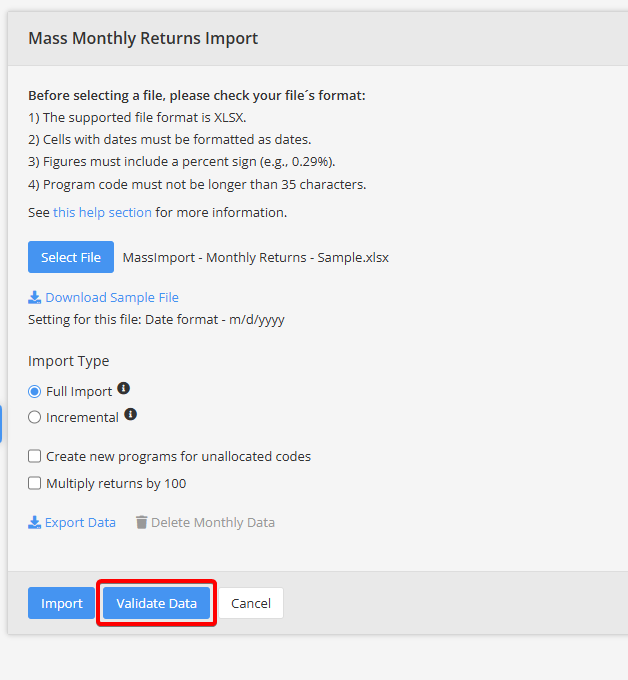
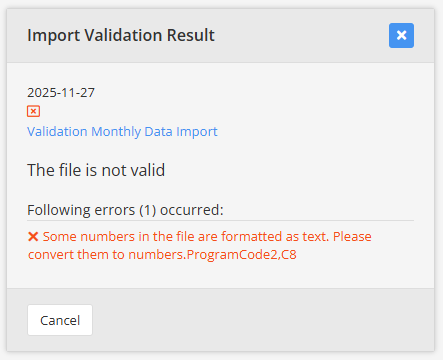
We believe that with this new feature, importing data has never been smoother. Go ahead and give it a try – we hope you’ll enjoy flawless fund factsheet data imports every time.
Leave A Comment