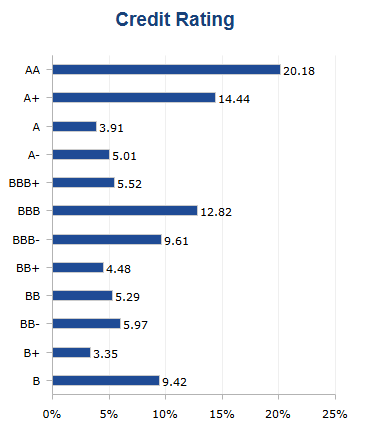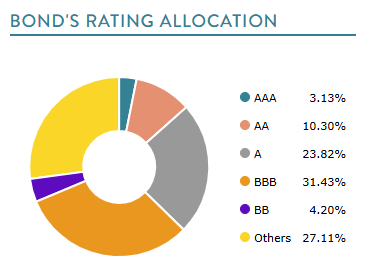
Use Credit Rating to record a portfolio’s allocation across credit-quality buckets and display the allocation in a factsheet.
Enter credit rating data
- Select the relevant program.
- Open Portfolio Composition / Credit Rating.
- Enter the percentage for each applicable rating bucket.
- Save your changes.
Available buckets are AAA, AA+, AA, AA-, A+, A, A-, BBB+, BBB, BBB-, BB+, BB, BB-, B+, B, B-, CCC+, CCC, CCC-, CC+, CC, CC-, C+, C, C-, D, Not Ranked, and Others.
Import credit ratings
Use the Credit Rating category in Mass Portfolio Composition Import. Enter the rating bucket in the Field column and its numeric allocation in Value.
Display credit ratings in a factsheet
In Template Editor, add a Credit Rating table or Credit Rating chart. Open the control settings to configure the available display options.